
How the L2Exodus participation point system works
Complete guide · for players and leadersDKP stands for Dragon Kill Points. The idea comes from the earliest raiding games, and it exists to solve one very simple, very old problem:
The boss is down. One item dropped. Who gets it?
With no system, that call belongs to the leader. And that is where clans start to break: "the leader only gives to his friends", "I came to every raid and never got anything", "that guy showed up today and walked off with the drop".
DKP fixes it by turning favour into currency:
People who show up consistently build a balance and take the items. People who show up occasionally cannot compete. And most importantly: everything is recorded. Every point in or out carries a date, a reason and — when a leader granted it — the name of who granted it.
The system does not exist to give the leader more power. It exists so the leader does not have to decide alone — and so any member can verify the decision was fair.
There are two ways, and both lead to the same place.
Alt + B in game. The Community Board opens.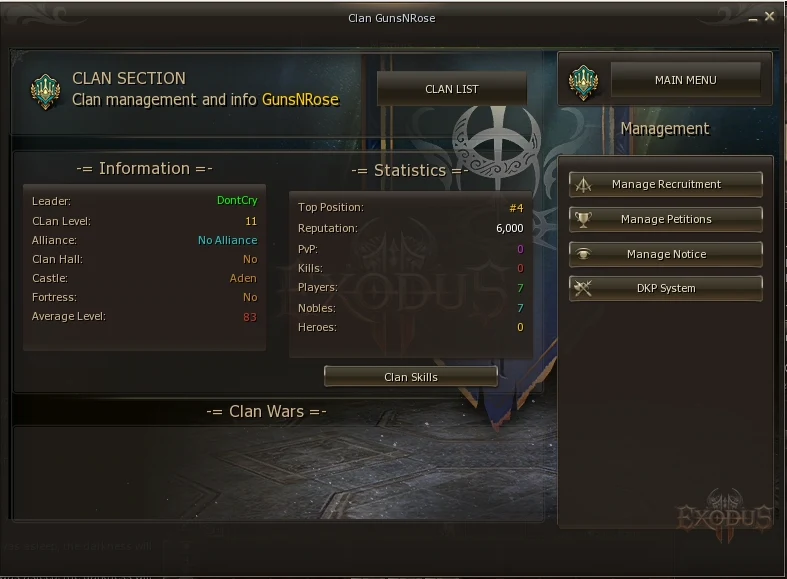
Type .dkp in chat and press Enter. Same screen.
You must be in a clan, and the clan must be level 5 or higher. Otherwise the panel tells you why and shows no points.
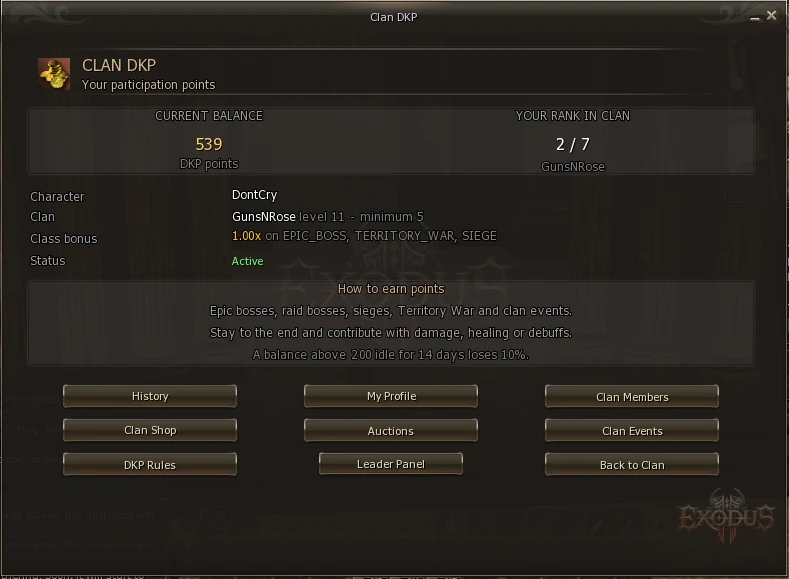
Your starting point. At the top are the two things that matter most: your balance and your standing inside the clan.
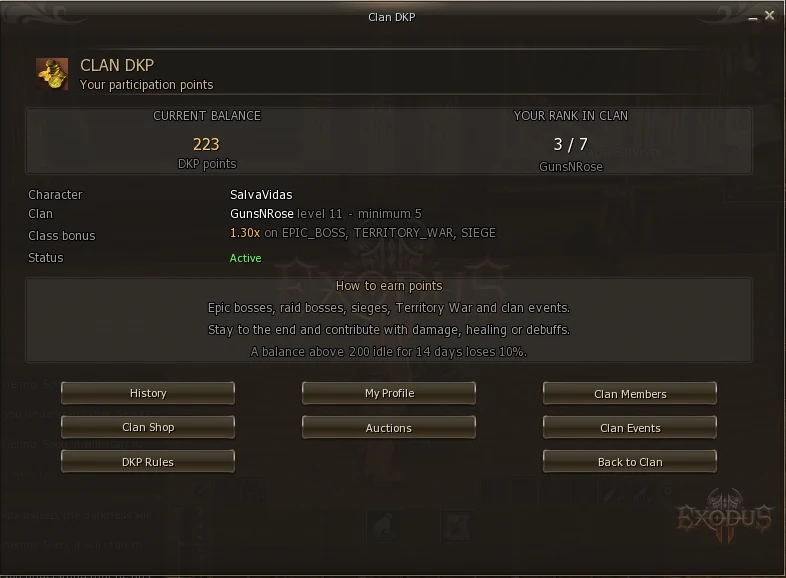
Below that are your details: character, clan, clan level and the class bonus your class receives (see section 6).
| Button | What it does |
|---|---|
| History | Every point entry on your account, newest first |
| My Profile | Summary of what you earned, spent and received |
| Clan Members | Every member and their balance |
| Clan Shop | Items on sale at a fixed price |
| Auctions | Items up for bidding |
| Clan Events | Every event the clan scored in |
| DKP Rules | What each activity is worth |
| Leader Panel | Only shown to leader and officer |
| Back to Clan | Returns to the clan page of the Community Board |
There are five ways to earn. Four are automatic — the server detects them on its own. The fifth depends on the leader.
| Activity | Points | What you need to do |
|---|---|---|
| Epic Boss Antharas, Valakas, Baium, Beleth |
50 | Be present for at least 70% of the fight |
| Epic Boss Queen Ant, Orfen |
15 | Same rule: 70% presence |
| Raid Boss | 2 to 15 by level |
Be near the boss at the kill, alive, with minimum damage dealt |
| Castle Siege | 40 +10 win, +5 alive at the end |
Spend at least 30 minutes inside the siege zone |
| Territory War | 40 +15 if you carried a ward |
Be registered and present for 30 minutes |
| Clan event | set by the leader | Take part in what the leader organised (see section 20) |
The clan leader can adjust every one of them inside a range the server allows — including switching raid boss points off entirely. The numbers above are the starting point, not a guarantee.
To see what your clan actually pays, open the Rules screen: it always shows the values in force for your clan. How the leader changes them is in section 11.
On a raid boss, the system credits the whole group — not only whoever swung. If anyone in your party dealt enough damage, everyone in the party and command channel scores. Bishop, Prophet, Sword Muse: you get paid the same.
Points do not land during the activity. They land when it ends:
If you have been in a siege for 20 minutes and see no points, nothing is wrong. Wait for it to finish.
back to contents ↑The main rule is presence. The server samples, second by second, who was there — and you need to have been present for at least 70% of the event.
Which means:
There is an option to also require a minimum of damage, healing or debuffs. On L2Exodus it ships switched off, for a concrete reason: in a real Baium run, a Cardinal present for 79% of the fight healed 117 in total, because nothing was taking damage. Worse, the server does not record buffs at all. A Prophet who buffs the entire fight scores zero on every metric.
Any numeric floor would reject exactly the support classes a clan needs most. So presence decides alone — and 70% of a contested epic costs real time either way.
Some classes receive a multiplier on their points. It is not privilege — it is recognition that their value never shows up on a damage meter.
| Role | Multiplier | Classes |
|---|---|---|
| Healers | 1.30x | Bishop, Cardinal, Elven Elder, Eva's Saint, Shillien Elder, Shillien Saint |
| Buffers | 1.25x | Prophet, Hierophant, Warcryer, Doom Cryer |
| Songs and Dances | 1.25x | Sword Singer, Sword Muse, Bladedancer, Spectral Dancer |
| Field support | 1.20x | Overlord, Dominator |
| Tanks | 1.15x | Paladin, Dark Avenger, Temple Knight, Shillien Knight and their evolutions |
Worked example: Baium is worth 50 points. A Cardinal who took part receives 50 × 1.30 = 65 points.
The bonus does not apply everywhere. It counts only on:
Epic Boss · Castle Siege · Territory War
That is, on the long organised fights where a healer or a tank carries weight no meter shows. Not on a routine raid boss. And not on a leader-created event either — because that is the one source nobody can verify.
Yes, but within limits the server owns — inside a range shown on the Rules screen itself, and at most one change per role every 7 days. This lets a leader encourage a class the clan is short on, without turning the bonus into a point tap. See section 10.
This is the most important screen in the system. It lists every entry on your account, newest first.
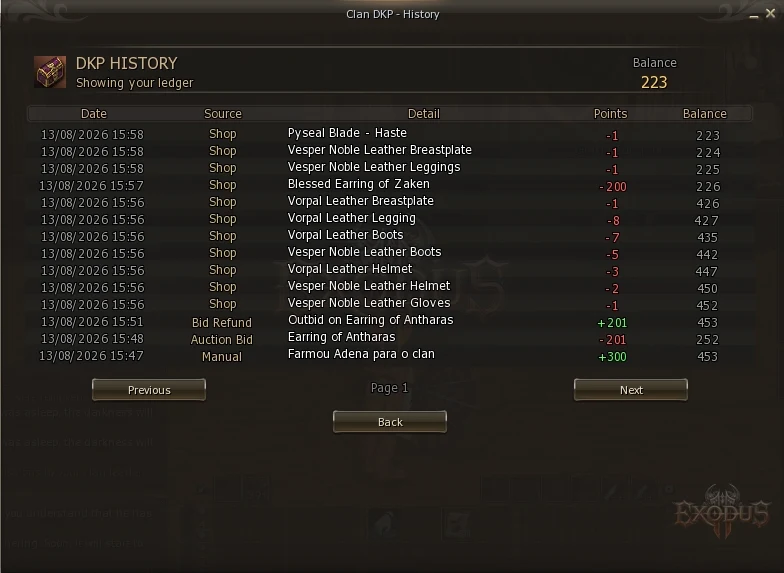
| Column | What it shows |
|---|---|
| Date | When it happened |
| Source | Where it came from: Epic Boss, Raid Boss, Clan Event, Shop, Auction Bid, Bid Refund, Manual… |
| Detail | The boss, event or item name |
| Points | What came in (green) or went out (red) |
| Balance | Your balance after that entry |
Take any line. Its Balance minus its Points must equal the Balance of the line below it exactly. If that holds all the way down, no point was created or lost. The server verifies this on every entry.
The summary of your DKP life.
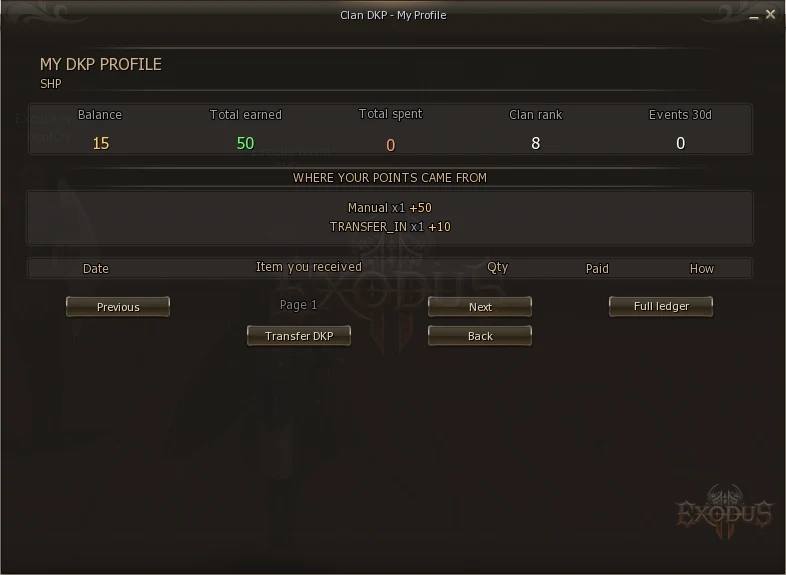
The middle block groups everything by source and shows the top 5. It tells you at a glance whether your balance comes from bosses, events or auction refunds.
The lower table lists the items that reached you, what you paid for each and whether it came from the shop or an auction. Full ledger opens the complete history.
back to contents ↑Everyone in the clan, ordered by balance.
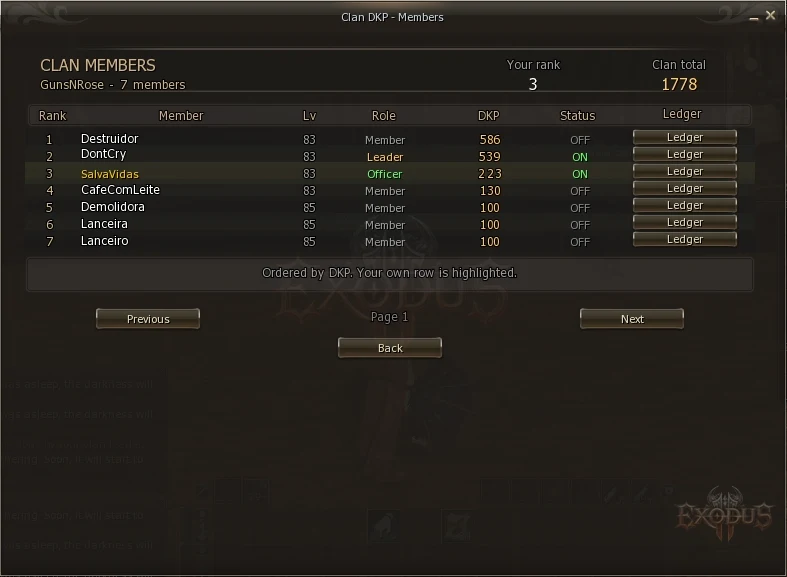
Leader the clan leader Officer granted power by the leader Member ordinary member
Officer is a rank of this system, not of the game. The Lineage 2 clan window does not know it exists. This screen is the only place members can see who was given the power to hand out points — and that has to be public.
The Ledger button next to each name opens that person's history.
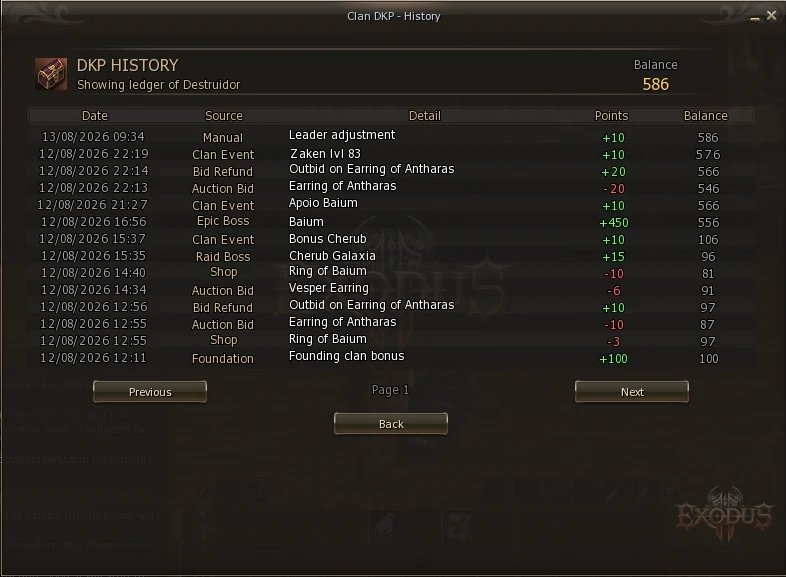
A DKP system only works if it is auditable. If nobody can check anyone else's points, the favouritism accusations come straight back. The leader can close this (section 21), but the default is open — and we recommend keeping it that way.
This screen publishes every number in the system, so any member can see what things are worth before deciding whether to show up.
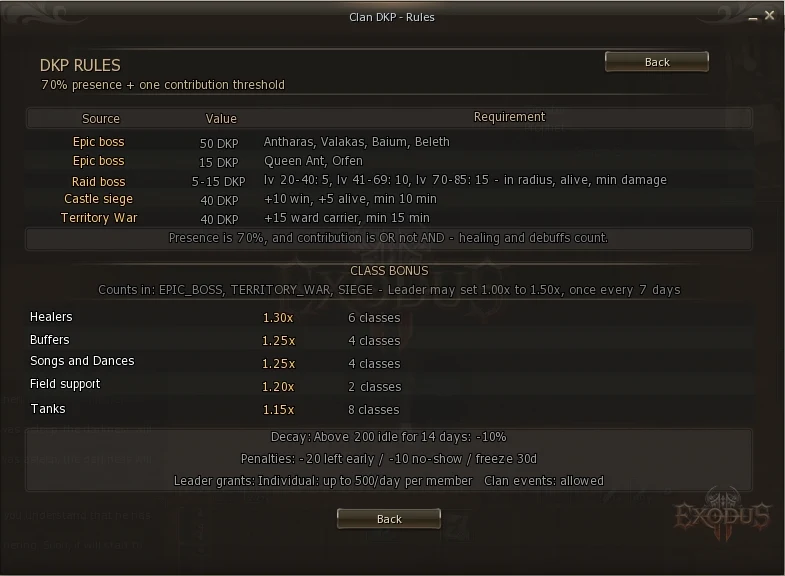
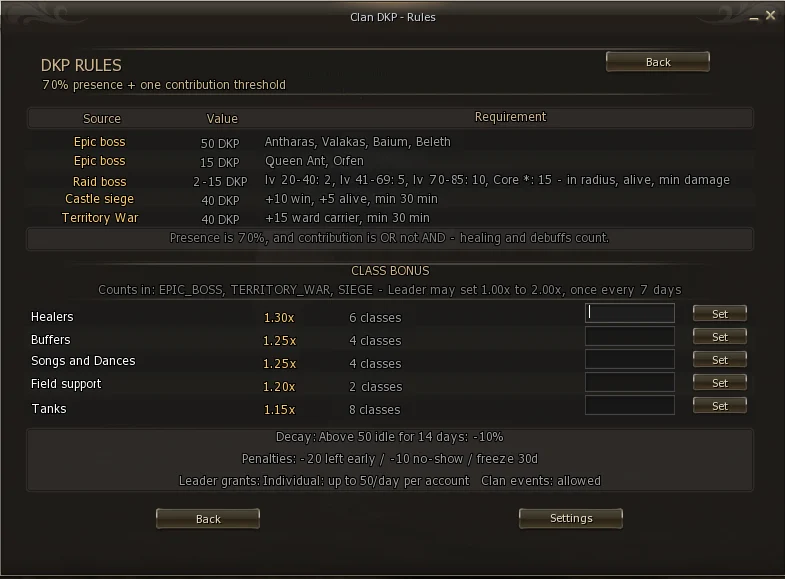
To change a role's bonus, the leader types the new value (for example 1.40) and clicks Set.
The 7-day cooldown has a specific purpose: without it, a leader could raise a class multiplier an hour before an epic and lower it afterwards. The limit turns the bonus into clan policy rather than a one-off manoeuvre.
The numbers here are your clan's, not the server's. At the bottom, the leader has a Settings button that opens the screens where those values are tuned — covered in section 11.
What each activity pays comes from a server setting, but the leader can tune the values for their own clan inside a range the server allows. That is what the Settings button at the bottom of the Rules screen opens.
The leader only. An officer does not see the button. Members keep reading the Rules screen as usual, showing the values their clan actually pays.
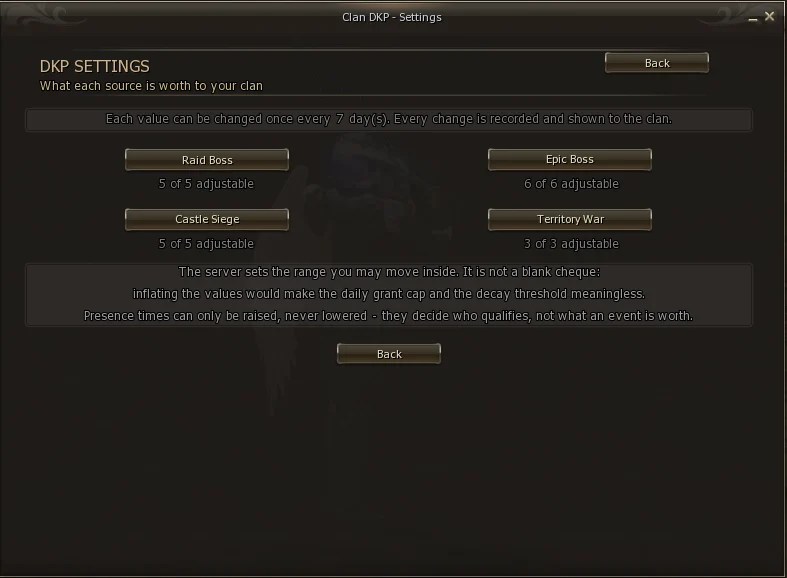
Every settings screen has a Server column and a Clan column. They are not two switches fighting each other — they are different things:
| Column | What it is |
|---|---|
| Server | The value configured on the server. It is what your clan pays while you change nothing, and it is what the Allowed range is calculated from. |
| Clan | What your clan pays today. Until somebody changes something, it matches the Server column. |
| Allowed | The range the server permits. Anything typed outside it is refused. |
| Changed by | Who made the last change, and when. Empty while nobody has. |
There is no "reset" button. To go back, type the number shown in the Server column and press Set.
Same reason as the class bonus: without it, a leader could raise an epic an hour before the fight and lower it afterwards. The wait turns the value into a clan policy instead of a one-off manoeuvre.
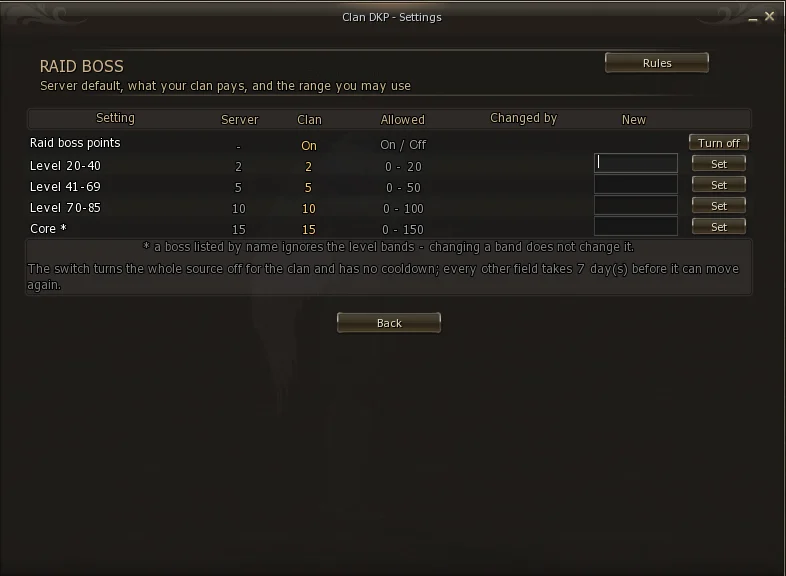
The first row is a switch for the whole source. Turned off, no raid boss pays your clan anything — neither the bands nor the bosses with their own value. It is the one thing on the screen with no 7 day wait: turn it on and off whenever you like.
A boss listed by name (like Core *) ignores the level bands. If you raise the 70-85 band and Core keeps paying the same, that is not a fault — it is matched before the bands. To change Core, change Core's own row.
Anyone who goes the decay period without receiving any points, while above the minimum balance, loses a share of it (see section 24). If raid bosses were a member's main source, switching the source off can make them decay while still playing actively.
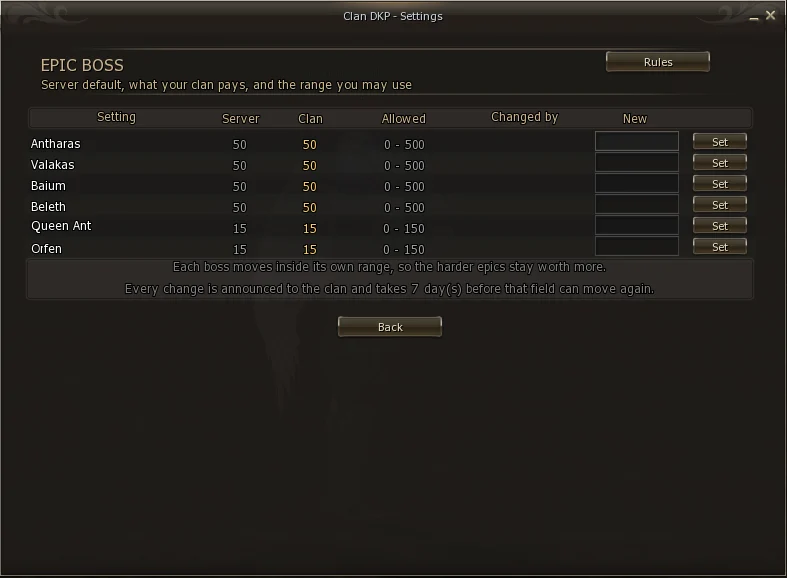
The range is calculated from each boss's own value, not from one shared number. That is why Antharas and Orfen have different ranges: the server values already encode difficulty, and the range preserves that order. If you really want to invert it and pay more for Orfen, you can — but you have to type that on purpose; it does not happen by accident.
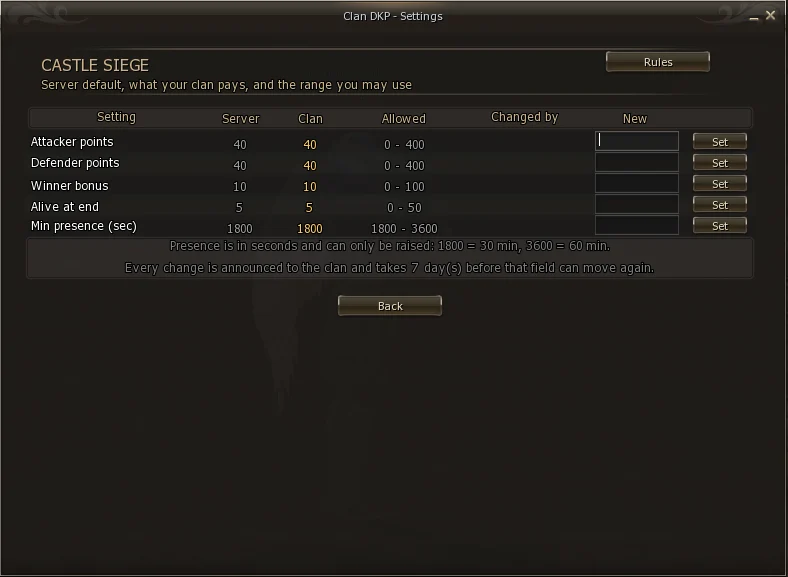
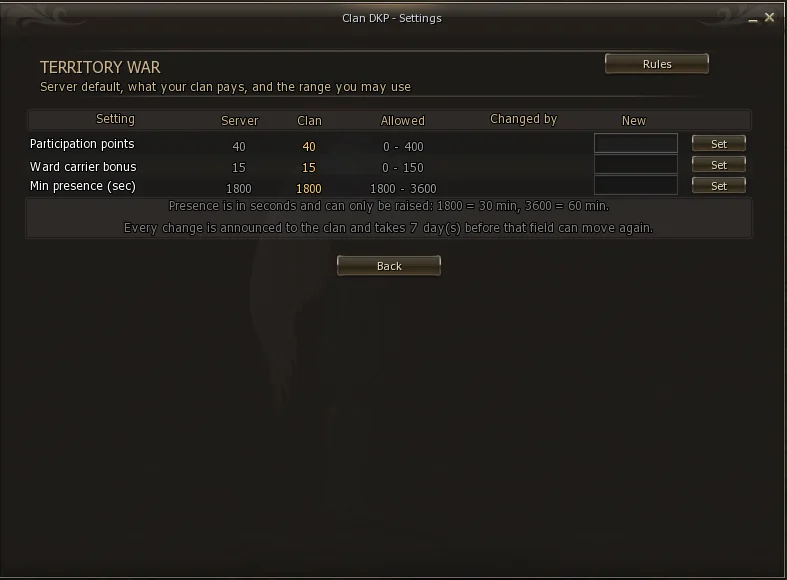
Min presence on both screens is in seconds, and the leader can only raise the server value, never lower it.
The reason is that presence does not answer "how much is it worth" — it answers "who qualifies". Dropping it to zero would not be tuning a number, it would be deleting the participation rule the whole system rests on. A leader may demand more of their clan; they may not demand less than the server does.
Items at a fixed price. First to click takes it.
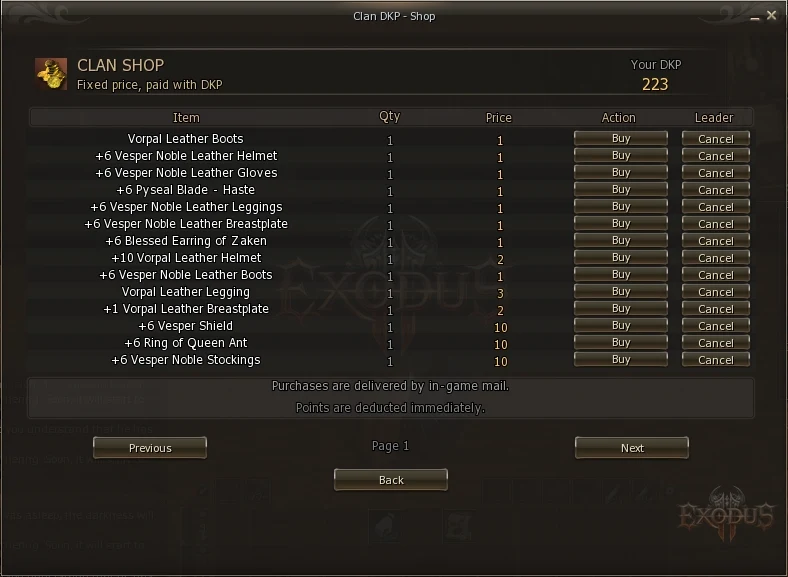
The purchase is refused and you are told how much is missing. The balance never goes negative.
When an item is contested, the leader auctions it instead of pricing it. Whoever wants it most pays most.
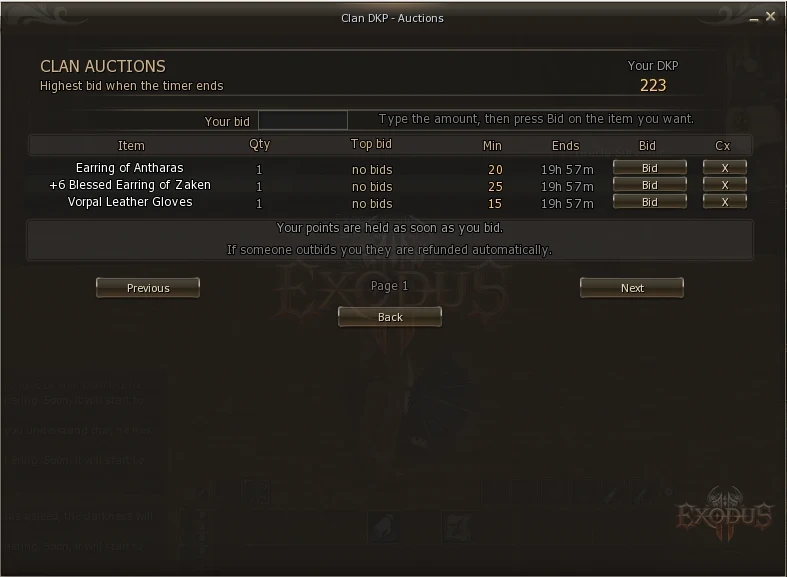
Without it you could place a huge bid, spend the same points in the shop, and win the item for free. Freezing guarantees every bid is backed.
| Situation | What happens |
|---|---|
| Someone outbids you | You are refunded automatically and notified. It shows as Bid Refund in your history. |
| You win | The item arrives by mail and the frozen points are consumed. |
| Nobody bid | The item returns to the Item Pool for the leader to decide again. |
The leader can limit an auction to people who attended a minimum number of events in the last 30 days, or to specific classes — useful so a mage weapon is not won by a warrior planning to resell it.
Where History shows your timeline, this screen shows the clan's: every event the clan scored in, automatic or leader-created.
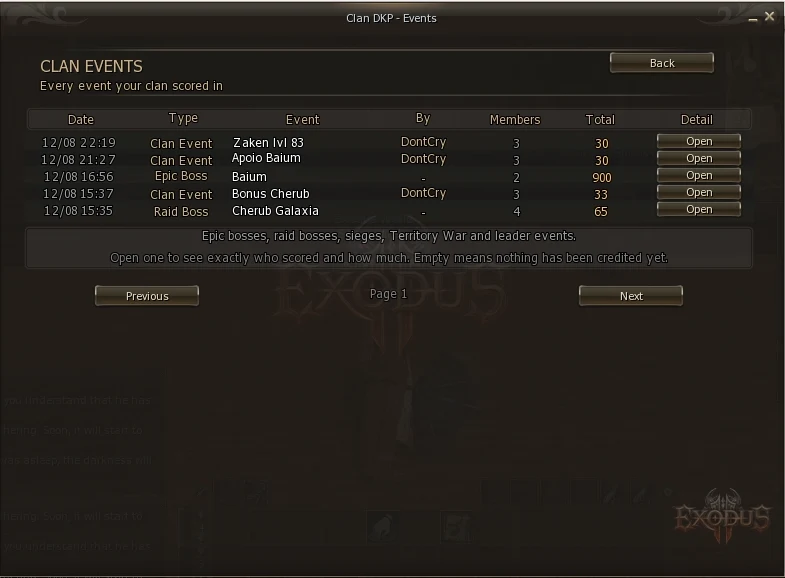
Open shows the detail of that event.
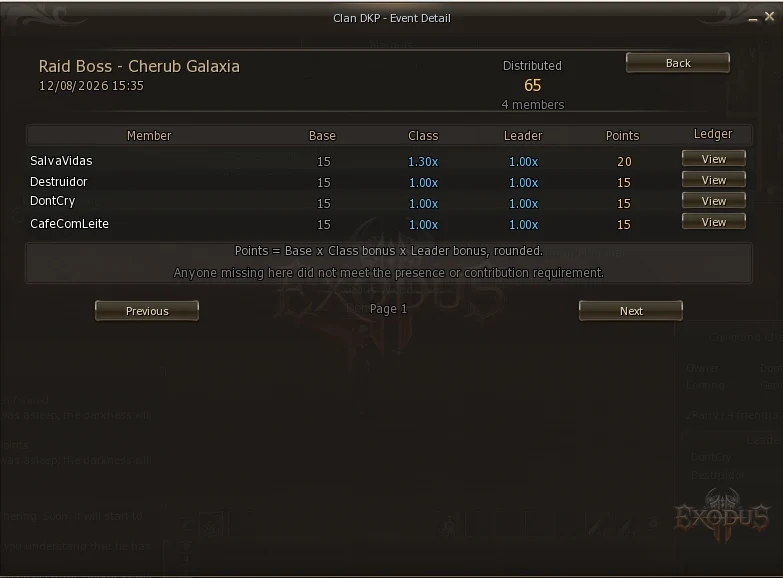
It is the screen that ends arguments. "I was at Baium and got nothing" — open the event, and either the name is there or it is not. No one has to rely on memory.
The admin hub. Only leader and officer can open it.
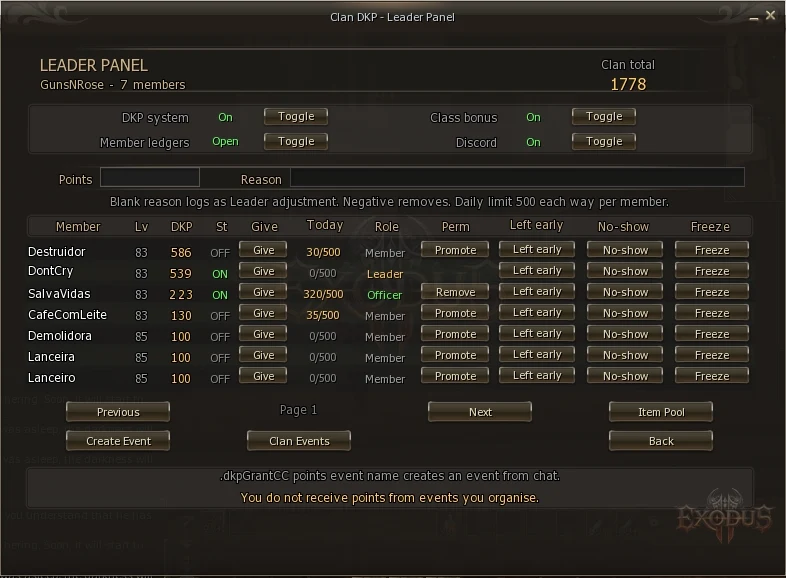
| Column | What it is |
|---|---|
| Member / Lv | Name and level |
| DKP | Current balance |
| St | Online (green) or offline (grey) |
| Give | Applies the value typed in Points to that member |
| Today | How much that member already took today, against the daily limit |
| Role | Leader, Officer or Member |
| Perm | Promotes or removes officer rank — only the leader sees this |
| Left early / No-show / Freeze | Penalties (section 18) |
It shows before you click that a member has already hit the daily cap. Without it the button would simply refuse and look broken.
A leader cannot be online all the time. The officer solves that: a member granted permission to run day-to-day DKP.
In the leader panel, click Promote on the member's row. To revoke, click Remove.
An officer cannot create another officer. If they could, one officer would promote a friend, who would promote another, and before long the leader would have lost track of who hands out points in their own clan. The power to delegate stays with the leader alone.
If an officer leaves or is kicked, the rank is deleted automatically. Rejoining later does not restore it — the leader must promote them again.
The leader panel has two fields side by side:
Leader adjustment.The justification appears in that member's history and to everyone who opens their ledger. A "+50 helped organise the Baium CC" ends any doubt. A bare Leader adjustment is what starts gossip.
| Limit | How it works |
|---|---|
| Daily cap | 50 points per account, per day — and it applies both ways: giving and taking. The Today column shows what has been used. |
| No self-granting | A leader cannot give points to their own character. |
| Everything logged | Every grant permanently records the name of who made it. |
The cap belongs to the whole account inside the clan. If you have two characters in the same clan and one of them already took 50 today, the other gets nothing until tomorrow — and the Today column shows the same figure on both rows.
Deliberate: a cap you multiply by logging a different character is not a cap.
The server administrator can disable individual grants without disabling clan events, and vice versa. They are different acts: handing points to one person rests on the leader's word alone; crediting an event has witnesses and shows up on the Events screen.
Three buttons on every row of the leader panel:
| Button | Effect | When to use it |
|---|---|---|
| Left early | −20 points | Left mid-raid without warning |
| No-show | −10 points | Confirmed attendance and did not turn up |
| Freeze | Blocks for 30 days | Serious cases |
It blocks earning and spending. The points stay, but the account is stuck. Two important exceptions:
The system never applies a penalty on its own. Telling a disconnect apart from someone abandoning a raid takes human judgement, and automatically punishing someone whose connection dropped would be unfair.
The clan's item store. Every drop travels through here on its way to a final owner.
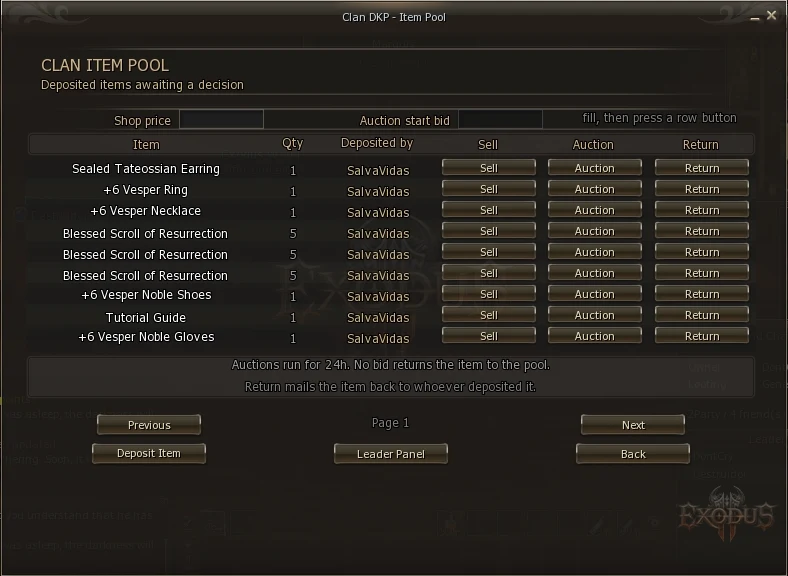
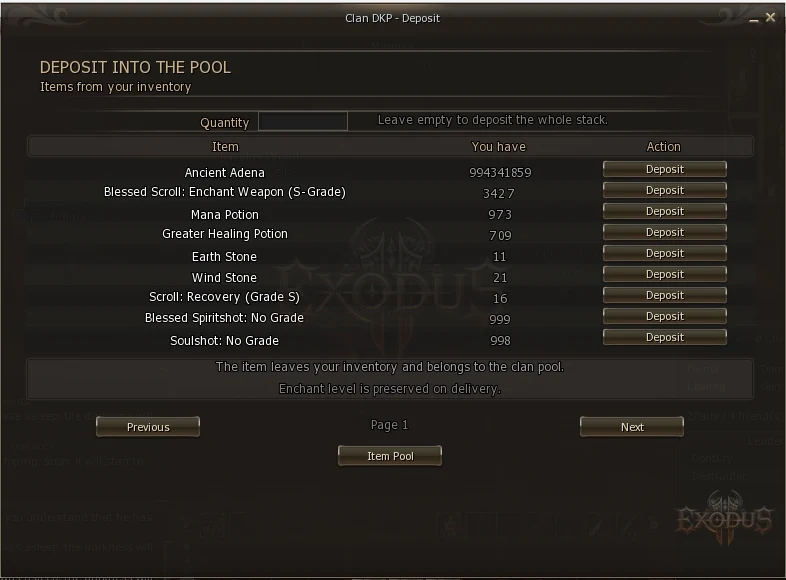
| Button | What it does |
|---|---|
| Sell | Type a price; the item goes to the shop at that fixed price |
| Auction | Type a starting bid; the auction runs for 24 hours |
| Return | Mails it back to whoever deposited it |
Equipped items, quest items, shadow items, time-limited items, adena, pet collars, augmented items and items with an elemental attribute. Depositing destroys the item and recreates it on delivery — which would strip those attributes.
The server does not let the system intercept a boss drop straight into the pool without modifying the game core. It is the one manual step in the flow.
For rewarding what the server cannot detect on its own: a PvP practice, an organised farming run, helping a member with a quest.
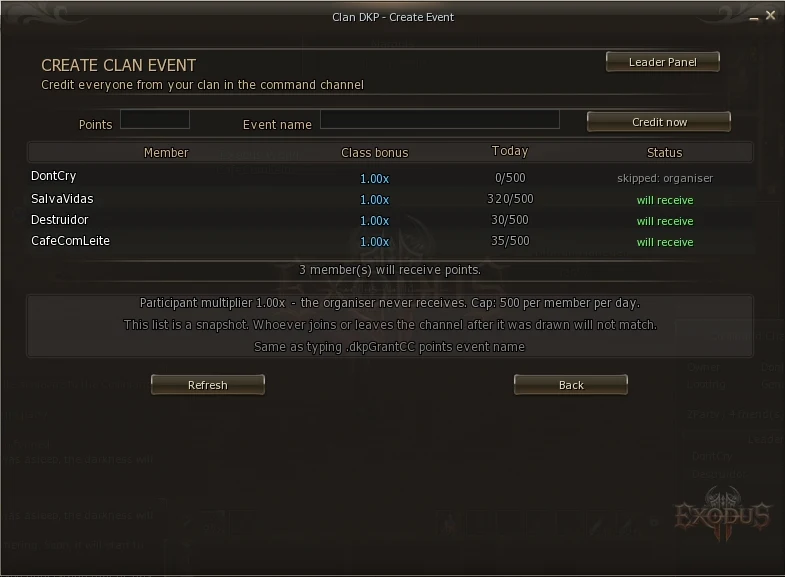
From chat, the same result: .dkpGrantCC 30 PvP practice
Whoever creates the event does not receive points from it. That removes the incentive to create events for oneself.
Four switches at the top of the leader panel. Only the leader may change them — not an officer.
| Option | What it does | Recommendation |
|---|---|---|
| DKP system | Turns the system on or off for the whole clan | On |
| Member ledgers | Open: any member can see any other's history Leader only: leader and officer only | Open — transparency is what holds the system up |
| Class bonus | Turns the class multipliers on or off | On |
| Discord | Turns the clan's Discord notifications on or off | As you prefer |
These four switches decide what is on. How much each activity pays is a different thing, configured from the Settings button on the Rules screen — see section 11.
Some settings live on the L2Exodus website rather than in game.
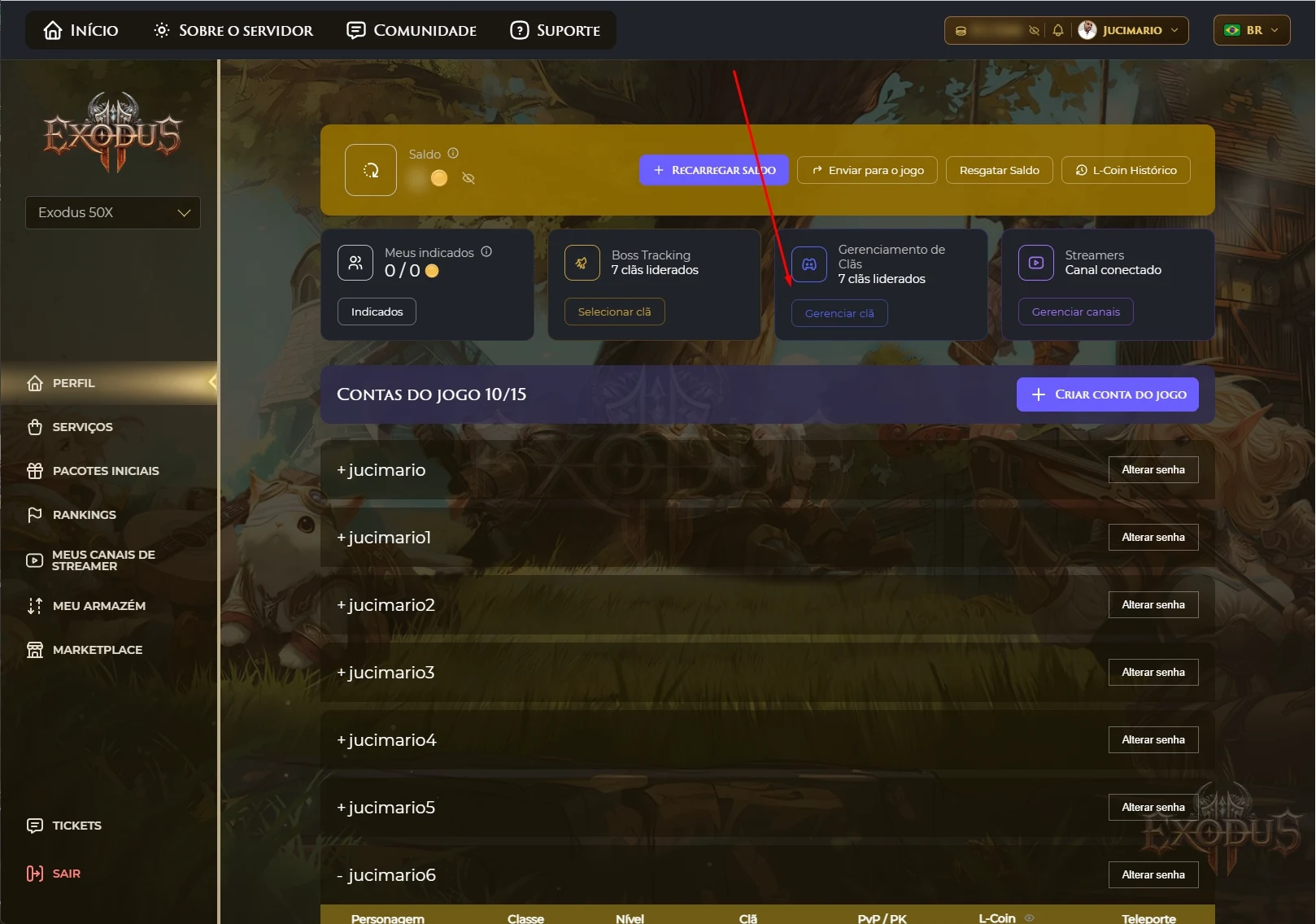
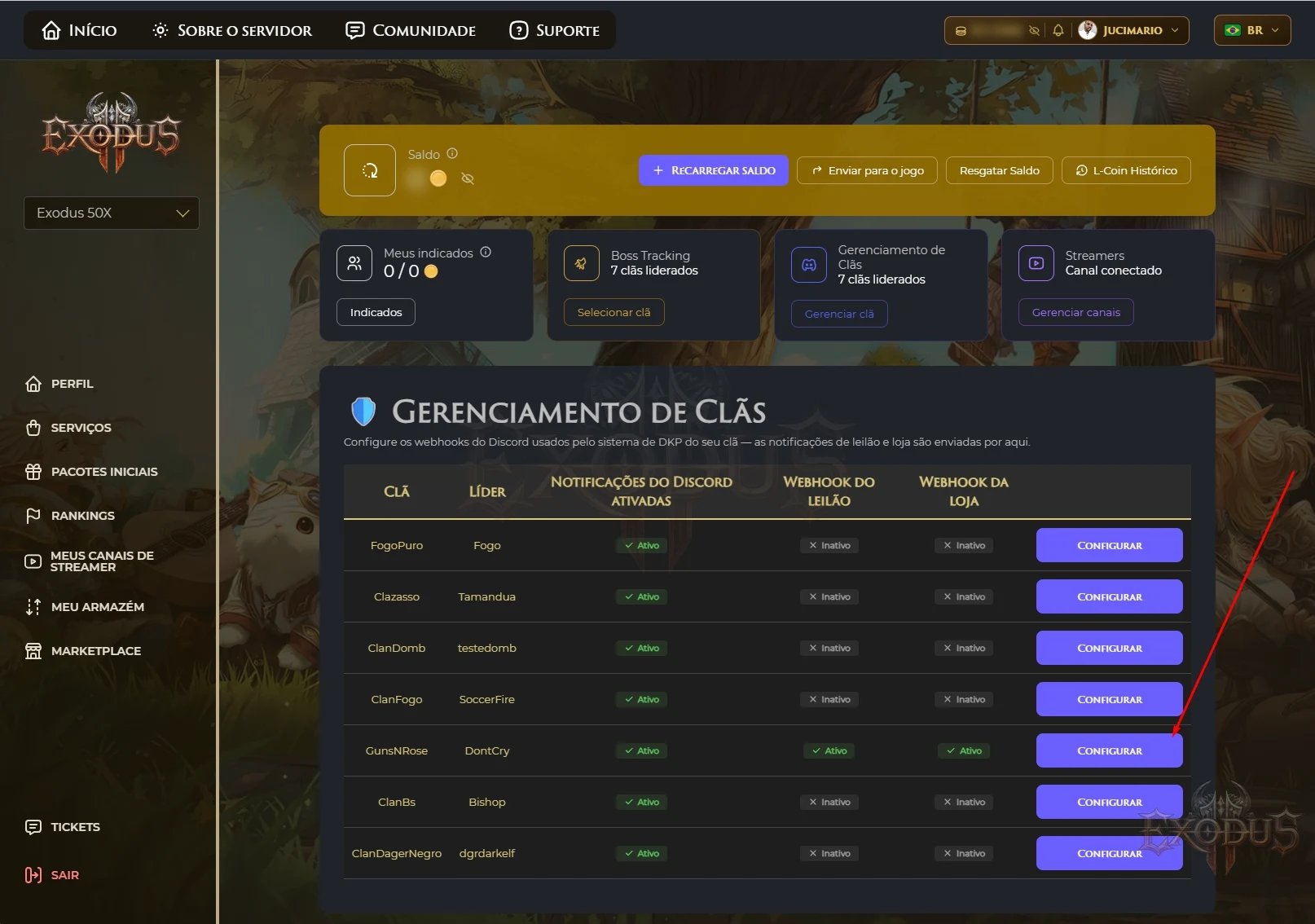
Your clan can receive automatic Discord alerts: auction opened, auction ending soon, item sold, winner announced. There are two separate channels — one for auctions and one for the shop.
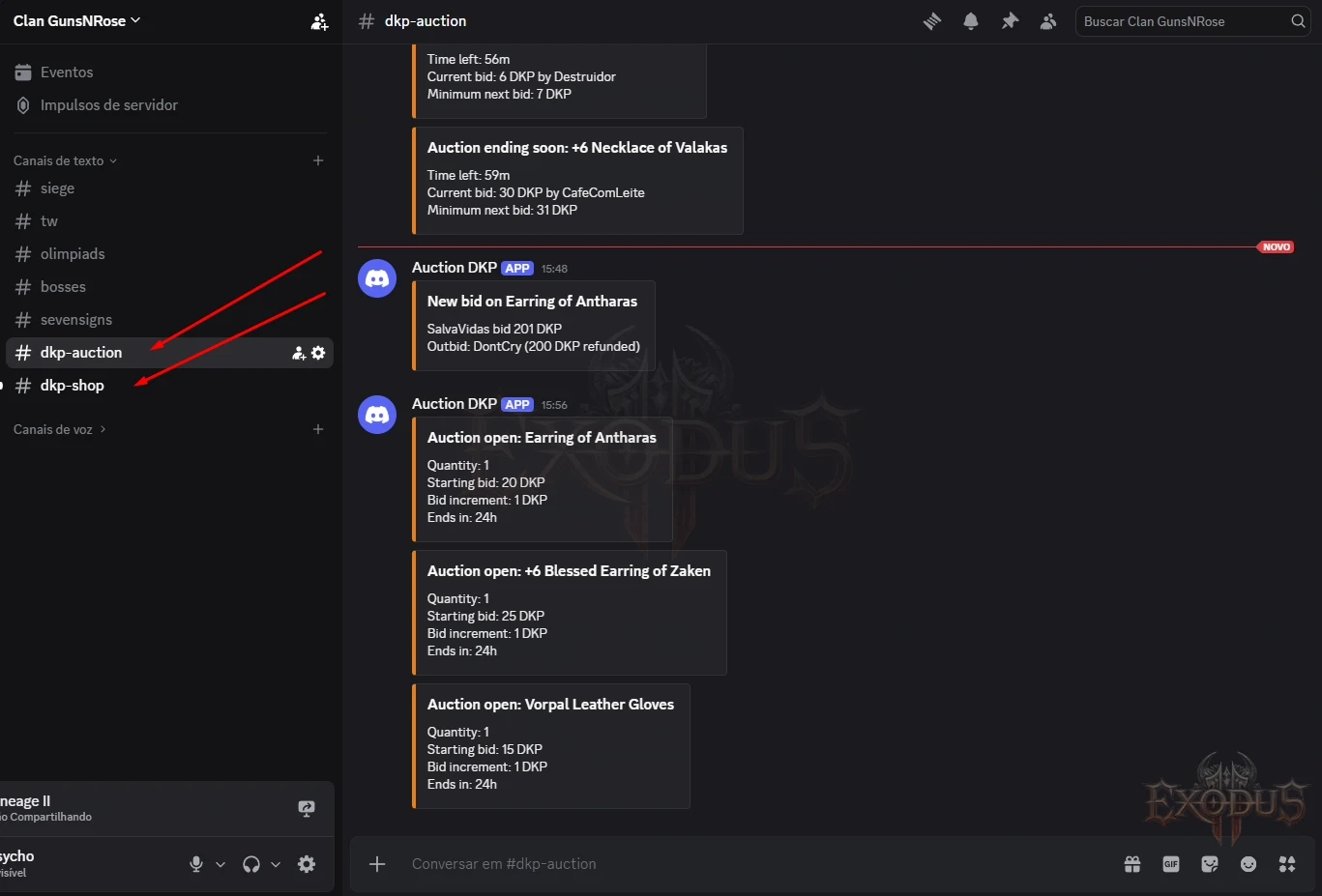
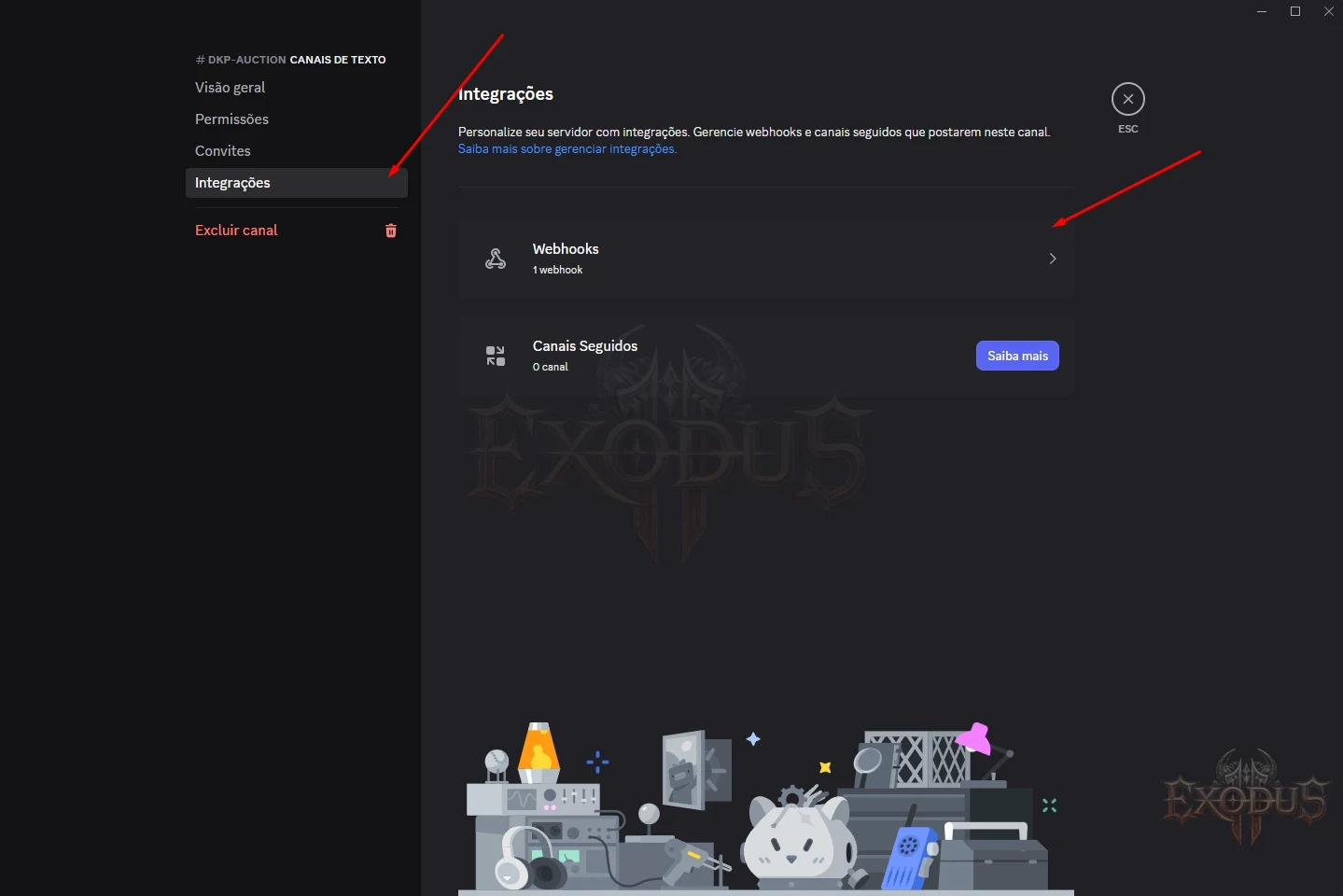
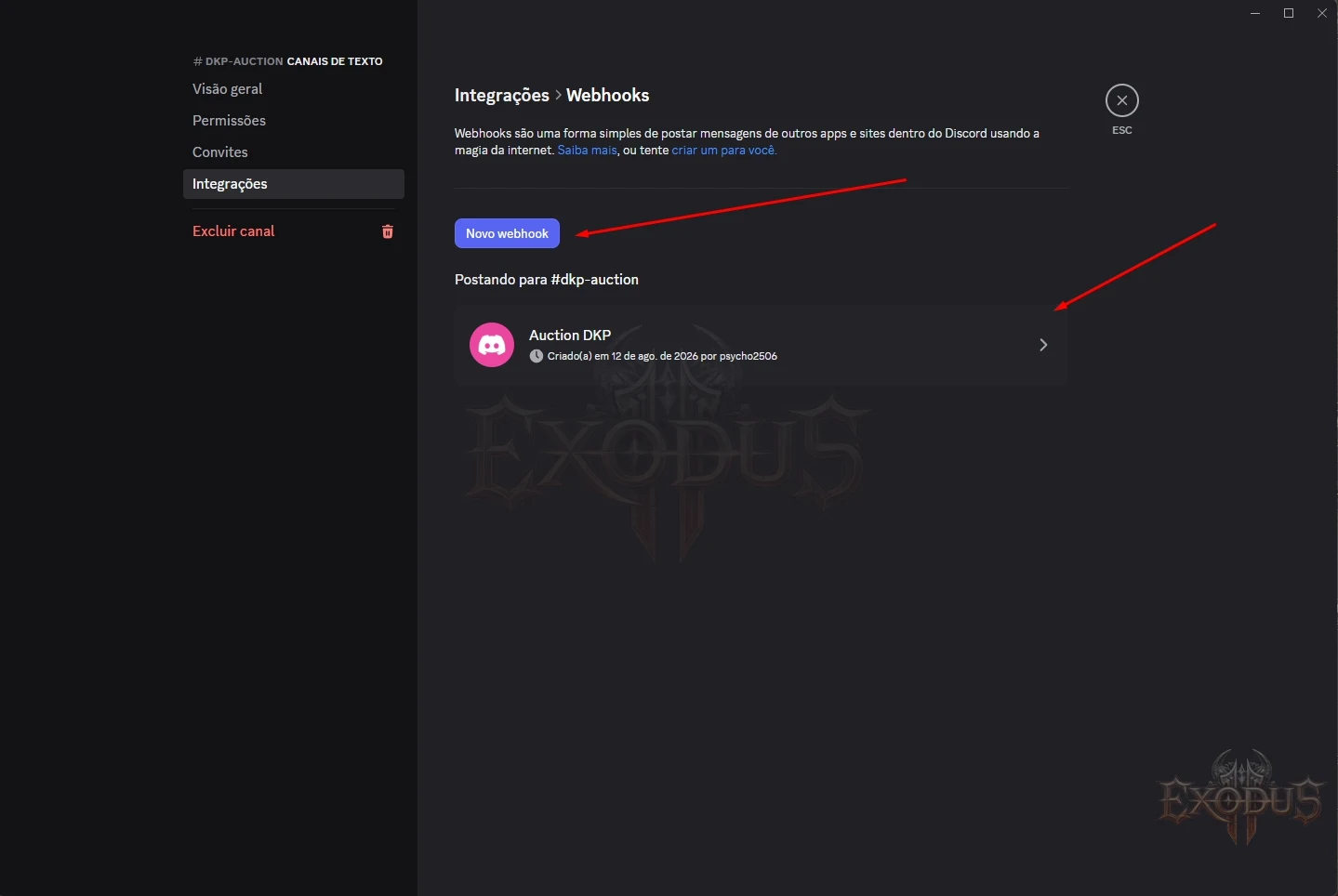
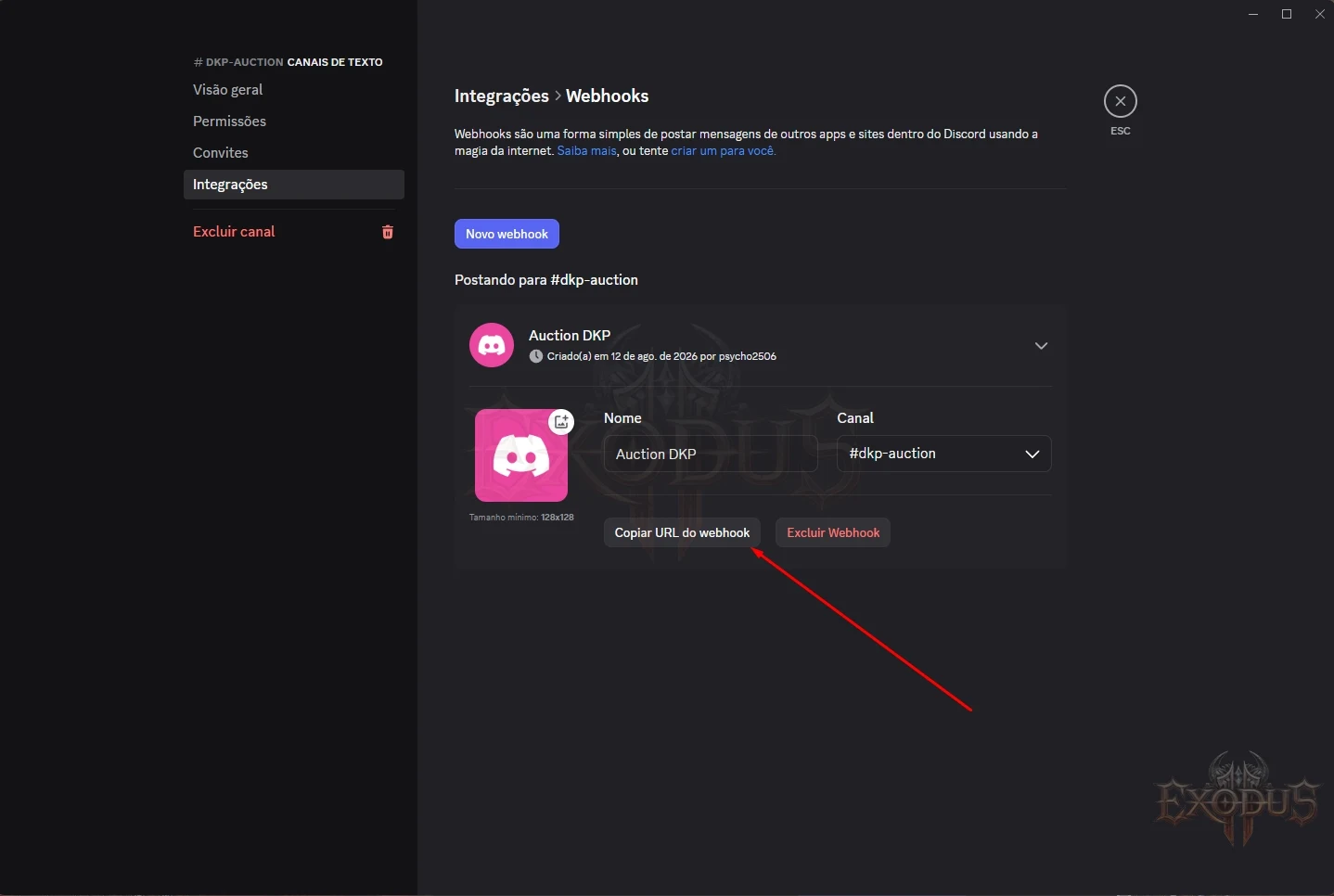
Anyone holding the webhook URL can post in that Discord channel. Do not paste it in public chat, do not include it in a screenshot, do not share it with people who do not administer the clan. If it leaks, delete the webhook in Discord and create a new one.
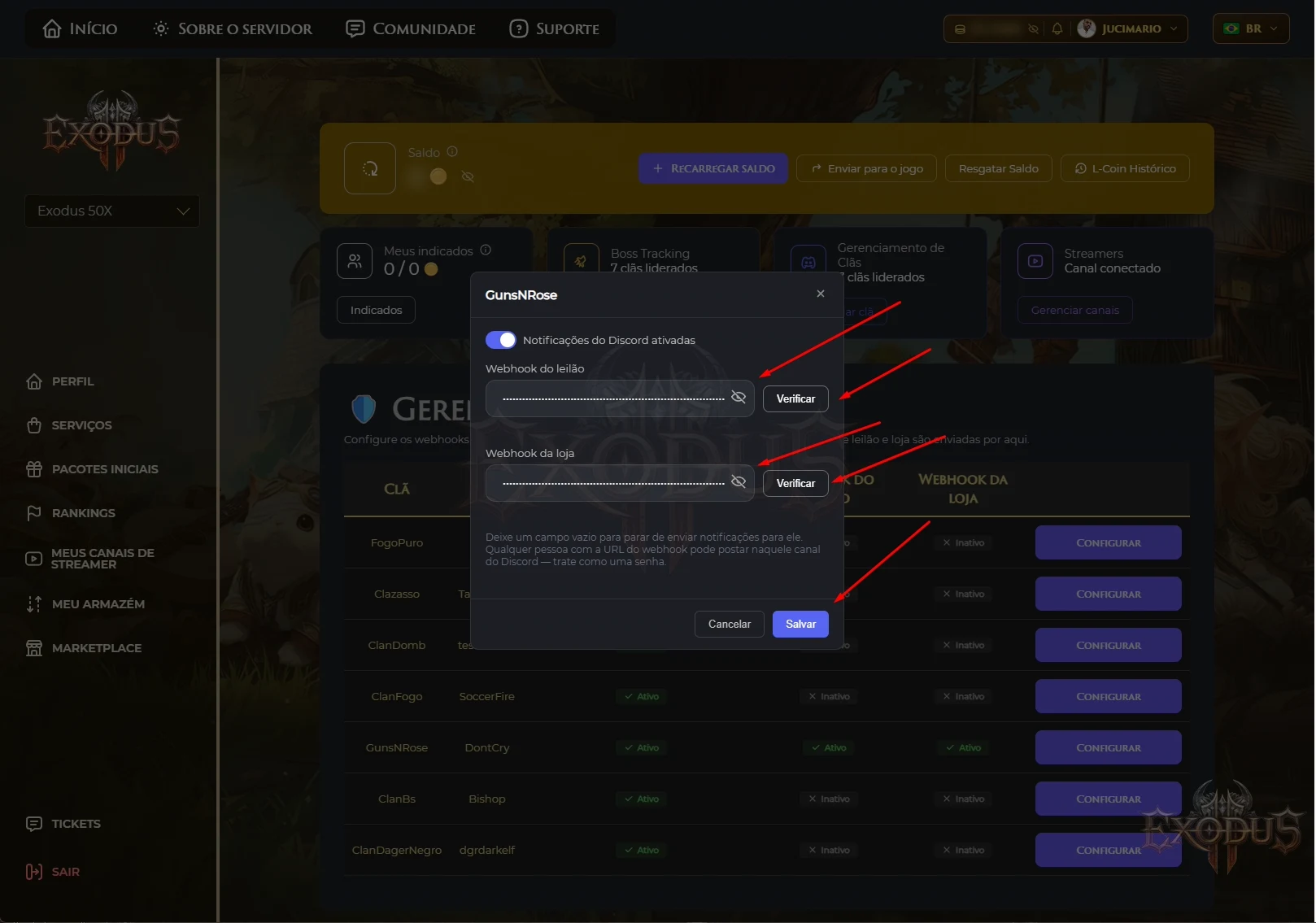
The system only accepts URLs starting with https://discord.com/api/webhooks/ or https://discordapp.com/api/webhooks/. Any other address is rejected — on the game server as well as on the website. And the URL never appears in any log.
An idle balance loses value over time:
Balance above 200 + 14 days with no earnings = loses 10%
Without decay, a veteran banks thousands of points, stops playing for months, comes back and outbids everyone who was there the whole time. Decay makes points represent recent participation, not historical.
If you play regularly you will never be affected — any earning resets the 14-day count.
Activity is measured for the account inside each clan, not per character. That cuts both ways:
If you have a character in clan A and another in clan B and only play A's, the one in clan B decays normally — in that clan you really were absent. Two separate clocks.
Moving points between your own characters does not postpone decay. Only real earning — bosses, sieges, Territory War, clan events and leader grants — holds the clock.
This is the feature that solves the oldest problem for anyone who plays more than one character:
You had been playing the Archer and built up points. The clan needs a Cardinal. You switch — and your points are stranded on the Archer.
Without transfers the system would be punishing the exact behaviour the clan wants. With them, you play what the clan needs and lose nothing.
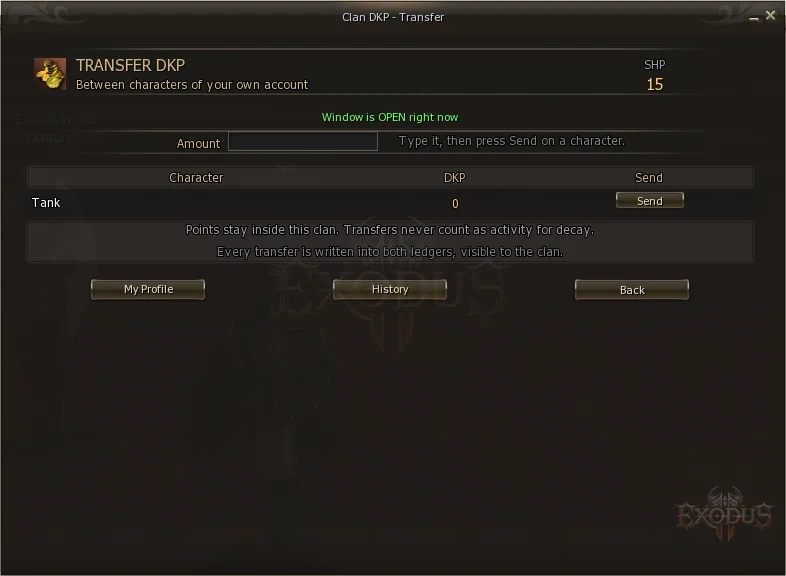
Transfers only happen on days the server configures — on L2Exodus, Monday, Wednesday and Friday.
Switching main is a one-off decision, not a weekly one — waiting for the next day costs nothing. And a fixed day turns transfers into something the clan can plan around and watch, instead of an invisible flow running in the background.
| Rule | Why |
|---|---|
| Only between characters of the same account | It is not a donation. You cannot pass points to another person. |
| Both in the same clan | One clan's points never travel to another. |
| A frozen character neither sends nor receives | Otherwise freezing would be decorative. |
| Always a positive amount | A negative one would reverse the direction and drain the other character. |
The sender gets a "Transfer Out — To <Name> (same account)" line and the receiver a "Transfer In — From <Name> (same account)". Since ledgers are public, the whole clan can see it. Transfers are auditable, not magic.
Leaving a clan forfeits every point you earned in it. No warning, no refund, no undo.
Points belong to the clan they were earned in and never travel. This applies to every departure: leaving by choice, being kicked, or leaving and rejoining later.
It is recorded in your history, naming the clan:
| Date | Source | Detail | Points |
|---|---|---|---|
| 14/08/2026 11:04 | Left Clan | Left the GunsNRose clan | −378 |
The bid is voided and the item returns to "no bids" for the clan. The points already escrowed are forfeited with everything else — leaving takes all of it.
That is treated differently, because nobody chose to leave:
Kicking someone destroys their points immediately. There is no confirmation and no undo. Think twice before kicking in the middle of an argument.
Three possibilities: you spent less than the minimum presence time inside the zone; the siege has not ended yet (points land at the end); or your clan has DKP switched off.
No. The rule is presence, and you also get 1.30x on epics, sieges and Territory War. A Bishop who attends earns more than a damage dealer who attends.
That was an old bug and it is fixed. Credit now goes to the whole group. If it happens again, open the event under Clan Events → Open and show the list to your leader.
They did not vanish — they are frozen in the auction. If someone outbids you they come straight back as Bid Refund.
Yes, under Clan Members → Ledger, if the leader keeps the option open.
The balance belongs to the character. But officer rank is deleted on leaving and must be granted again.
Delivery is by in-game mail — check your mailbox. If it genuinely failed, the system records the failure and tells you immediately; open a ticket with the item name and the time.
No. The system refuses. Whoever organises an event is also not paid for it.
24 hours by default. The remaining time shows on the Auctions screen, and Discord announces when it is close to ending.
back to contents ↑| Term | Meaning |
|---|---|
| DKP | Dragon Kill Points. The clan's participation currency. |
| Ledger | The record of entries. The system's source of truth. |
| Escrow | Points frozen while a bid is live. |
| Officer | A member granted DKP administration power by the leader. |
| Command Channel (CC) | Several parties joined under one command. |
| Epic Boss | Antharas, Valakas, Baium, Beleth, Queen Ant and Orfen. |
| Presence | The share of the event you were actually there for. Minimum 70%. |
| Decay | Losing 10% of a balance idle for 14 days above 200 points. |
| Webhook | A secret address letting the server post to a Discord channel. |
| Item Pool | The clan's item store, before items go to the shop or auction. |