
How to buy and sell items between players on L2Exodus
Complete guide · for playersThe auction is where one player sells to another player. You put an item up with a starting price, it stays available for 24 or 48 hours, and whoever holds the highest bid at the end takes it.
It exists to solve two problems the normal in-game trade does not handle well:
And the part that matters most if you are nervous about selling: nobody holds your item and nobody holds your money. The item leaves your inventory and sits in the server's custody. So does the bidder's coin. Neither one ever passes through another player's hands.
Nobody has to trust anybody. The server keeps the item and keeps the coin, and only hands both over when the auction ends — each one to the right side.
There is one way in: talk to the Auctioneer, the auction NPC.
The auction has no button on the Community Board and no chat command. That is deliberate: the actions that move an item or coin require you to be at the NPC. You can follow an auction from anywhere once the screen is open, but to list or bid you have to be there.
Level 40 to bid and level 40 to list. Your character also has to be at least 7 days old to bid — that rule exists to stop a character created on the spot just to inflate a price.
This is the starting point. At the top are your character and your status — whether you can already bid and list, or what is missing.
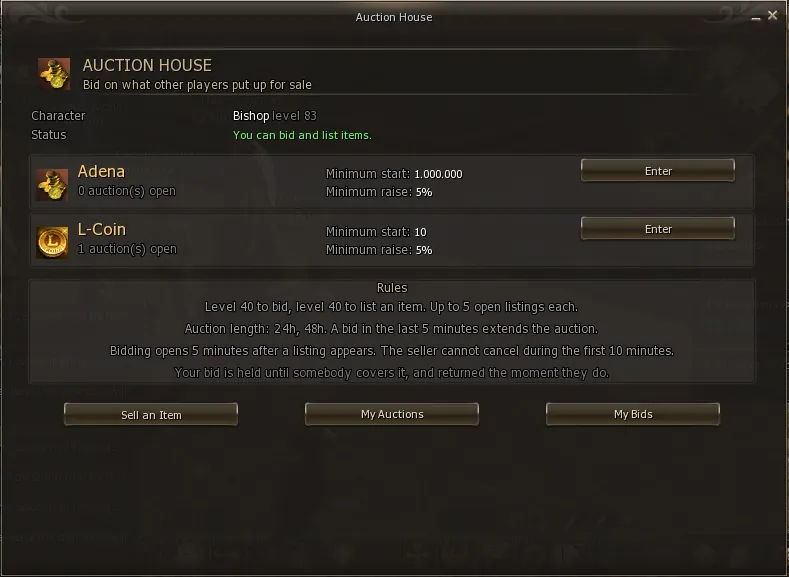
In the middle are the auction houses, one per currency, with how many auctions are open in each. Below, the Rules box repeats the rules that matter most — it reads the server configuration, so what it says is always what is actually in force.
| Button | What it does |
|---|---|
| Enter | Opens the list of open auctions in that house |
| Sell an Item | Pick an item from your inventory to list |
| My Auctions | Everything you have put up for auction |
| My Bids | Where your coin is: held, returned or spent |
Each house trades in one currency only. You choose which one to list in, and bidders pay in that currency.
| House | Currency | Minimum starting bid | Minimum raise |
|---|---|---|---|
| Adena | Adena | 1,000,000 | 5% of the current bid |
| L-Coin | L-Coin | 10 | 5% of the current bid |
The minimum raise being a percentage rather than a fixed value is what makes the auction work at both ends: 5% of 100 L-Coin is 5, and 5% of 3 billion adena is 150 million. A fixed step that made sense in one case would be absurd in the other.
If you try to list in the Adena house with a starting price of 500, it will be refused: that house's floor is 1,000,000. With 500 you can only use the L-Coin house. It is not a system error, it is the house floor.
Three screens: pick the item, set the price, pick the house and the duration.
Click Sell an Item. It shows what you carry that can be auctioned.
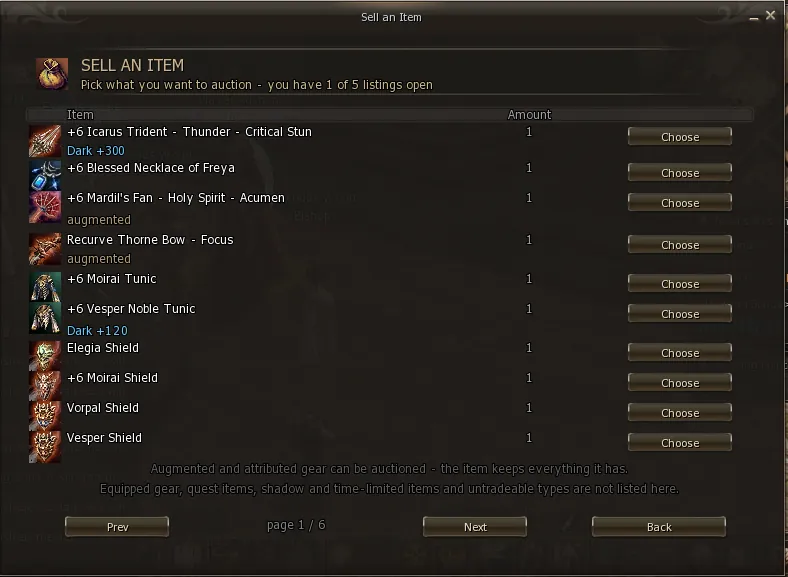
At the top the screen tells you how many listings you have open out of your limit (5 per character, 10 per account). Click Choose on the item you want to sell.
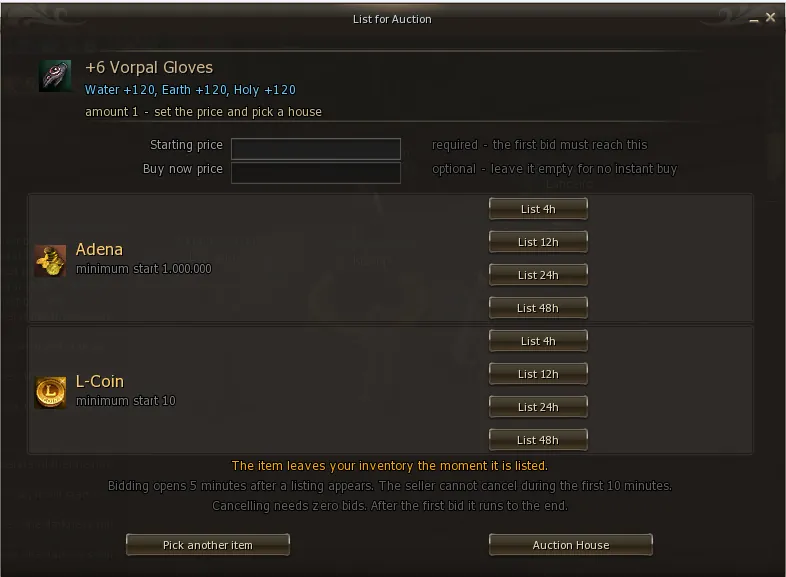
| Field | What it means |
|---|---|
| Starting price | Required. The first bid has to reach this value. Nobody buys below it. |
| Buy now price | Optional. Whoever pays this takes the item immediately and the auction closes. Leave it empty for no instant buy. |
| Amount | Only shown for a stackable item. How many you want to sell. See below. |
When the item is stackable — stones, scrolls, crystals — one more field appears, Amount, already telling you how many you hold.
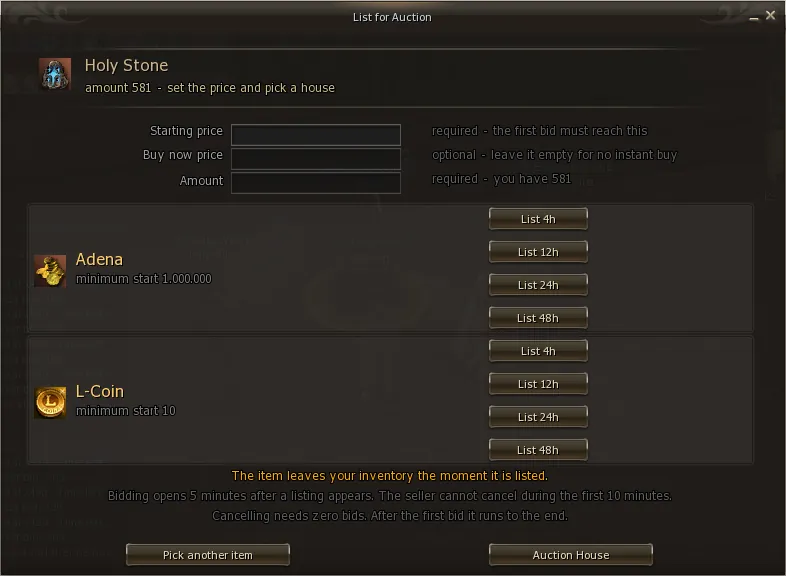
You choose how many go on auction and the rest stays in your bag. You can list 50 out of a stack of 581 and keep using the other 531 — or open several auctions from the same stack.
More than you hold, and nothing below 1. Leave it empty and the listing is refused with the maximum in the message — the system never decides "all of it" on your behalf.
Click the duration you want (4h, 12h, 24h or 48h) on the row of the house you picked. That is it: the item leaves your inventory at once and the listing goes live.
The moment you click, the item leaves your inventory and goes into the auction's custody. It comes back to you if the auction ends with no bids, or if you cancel before the first bid. While it is on auction you cannot use, sell or trade it.
Enchant, attribute, augment, soul crystal — everything travels with it and arrives identical for the buyer. The auction moves the real item, not a copy.
When an item goes on auction, two clocks start. They exist so that a listing is a commitment and not bait.
The item is announced to the server immediately, but the first bid is only accepted 5 minutes later. That gives whoever saw the announcement time to reach the NPC. Without this window, anyone already parked at the Auctioneer took everything before the rest had a chance to travel.
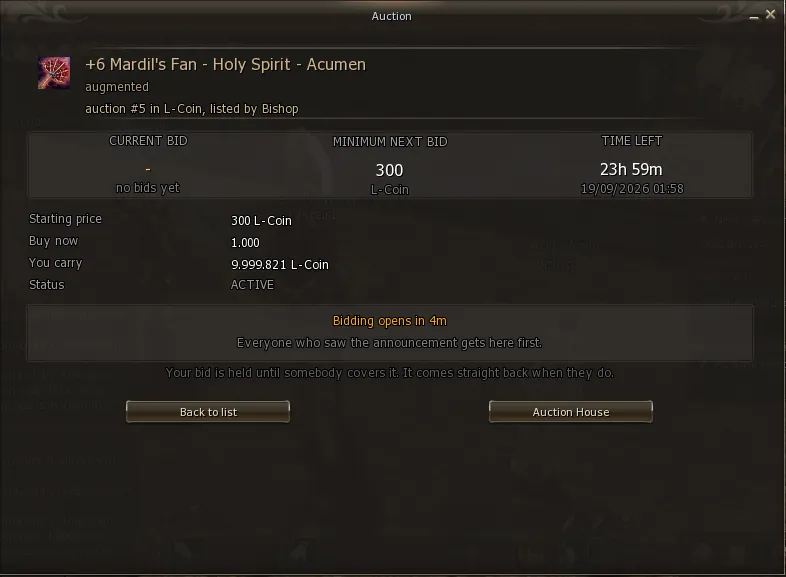
Whoever listed the item cannot cancel for the first 10 minutes. Without this lock, you could announce a desirable item to the whole server, gather a crowd at the NPC, and then pull it.
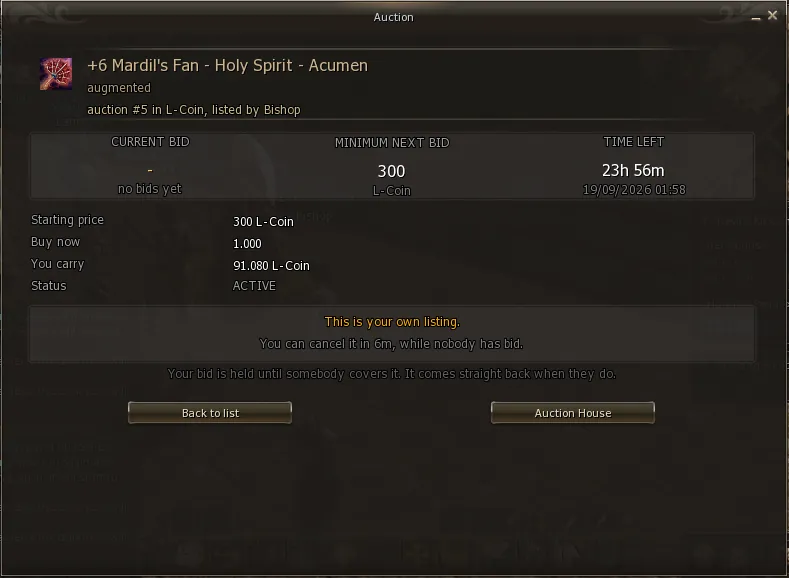
Bidding opens at 5 minutes and cancelling unlocks at 10. Which means: if somebody bids in between, the item can no longer be cancelled — cancelling always requires zero bids. That is intentional: the seller commits first.
The 5 minutes come out of the bidding time, they are not added to it. A 24h auction listed at midnight closes at midnight the next day, with bids accepted from 00:05.
On the main screen, click Enter on the house you want. The list is sorted by what closes first, not by what was listed first — whatever is about to end sits at the top.
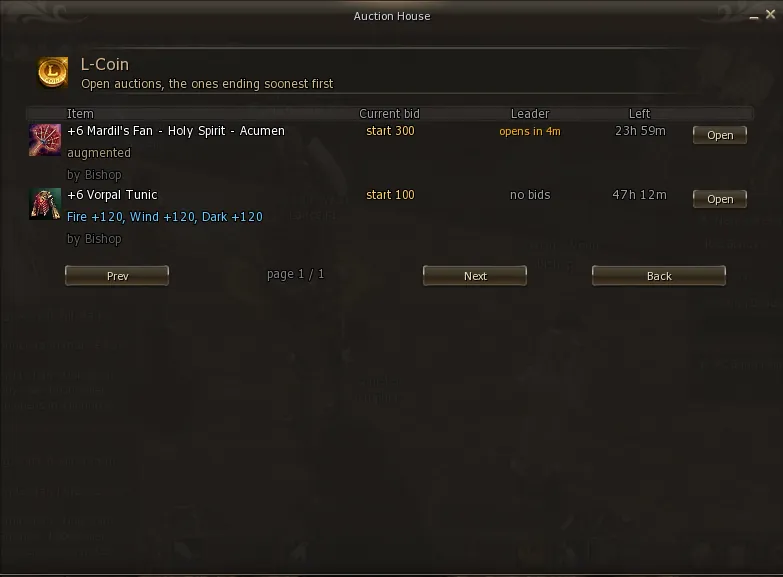
| Column | What it shows |
|---|---|
| Item | Name, enchant, attribute, augment and who listed it |
| Current bid | The current bid. With no bids yet it shows start 300 — the starting price |
| Leader | Who is winning, no bids, or opens in Xm during the opening window |
| Left | How long until it closes |
Click Open to see the item and bid on it.
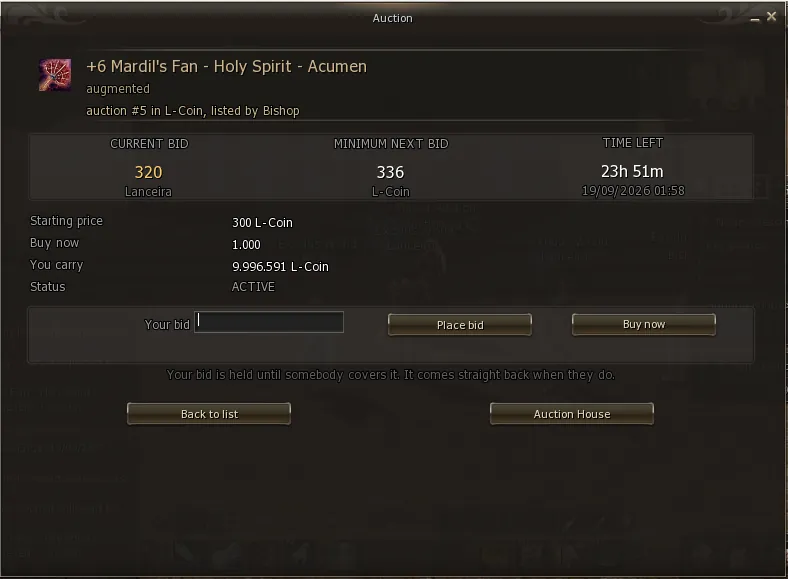
back to contents ↑The item screen shows the three numbers that decide your move.
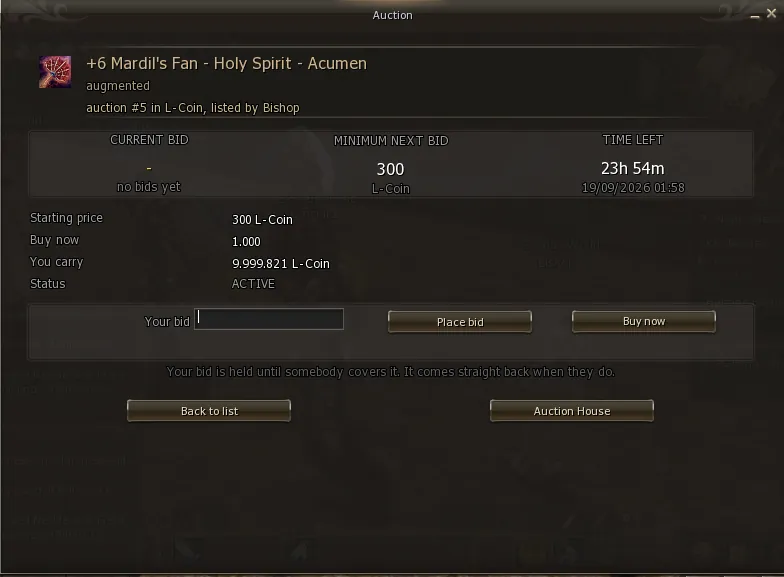
| Field | What it is |
|---|---|
| Current bid | The highest bid right now, and who placed it |
| Minimum next bid | The least you can bid. It already includes the current bid + 5% |
| Time left | How long remains, and the exact closing time |
| Starting price | The starting price the seller asked for |
| Buy now | The instant buy price, or - if there is none |
| You carry | How much of that currency you have right now |
Type the amount in Your bid and click Place bid.
Then you cannot bid again. Raising your own winning bid achieves nothing in an open auction, and the system refuses it rather than making you pay more for no reason.
Not even with another character on the same account. See section 16.
Buy now is optional: each seller decides whether to set one. That is why the item screen appears in two different shapes.
There is one extra button. Clicking it pays the Buy now price and closes the auction on the spot — the item is yours, no waiting for the clock and no chance for anyone to cover you.
The Buy now field shows - and only Place bid exists. There is no shortcut here: the only way to take the item is to hold the highest bid when the clock runs out.
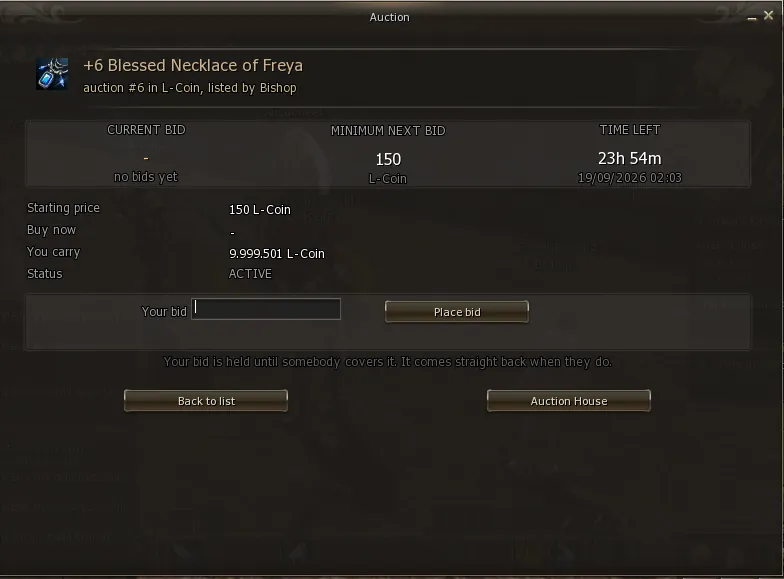
- and only Place bid.You pay the Buy now price, not what you typed. The system never charges more than the instant buy price.
This is the part that causes the most confusion, and it is simple:
There is never more than one held bid per auction. Only the current highest bid has coin locked — everyone else has already been repaid.
You can bid without fear of tying up your money across several auctions. It is only locked while you are winning.
The repayment is recorded before it is paid, and a routine finishes whatever was left pending when the server comes back. No held coin is lost to a server crash.
A bid placed in the last 5 minutes pushes the end of the auction out by 5 minutes.
Without it, the auction would not be an auction: anyone with a macro would bid on the last second and nobody would have time to answer. With the extension, everyone always has at least 5 minutes to cover.
The extension can happen at most 6 times on the same auction, so that two stubborn bidders cannot keep an item open forever — and cannot lock anybody's coin indefinitely.
back to contents ↑Lists everything you have put up for auction — open and closed.
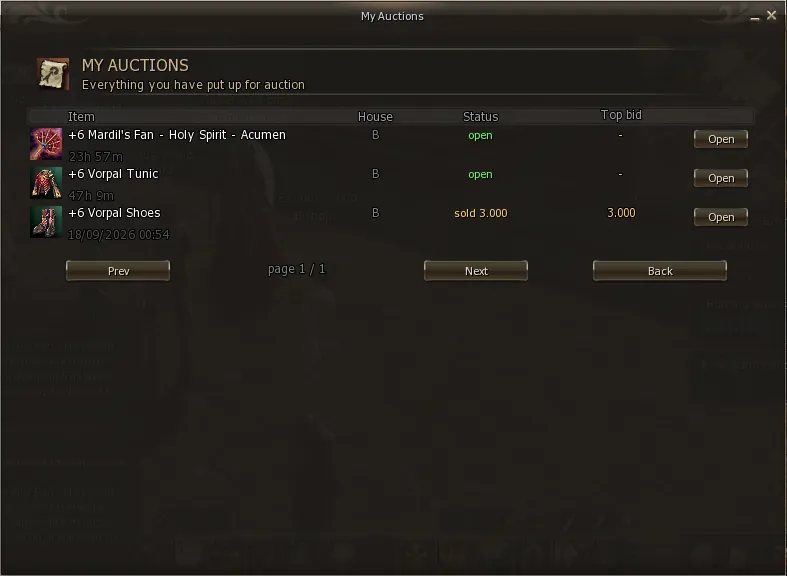
| Status | Meaning |
|---|---|
| open | On auction. The second line shows how long is left |
| sold | Sold, with the final price |
| returned | Ended with no bids and the item came back to you |
| cancelled | You cancelled it before the first bid |
Click Open on the item and use Cancel listing. Two conditions, both required:
Once cancelled, the item comes back to you by mail.
back to contents ↑This screen answers one question, and answers it directly: where is my money?
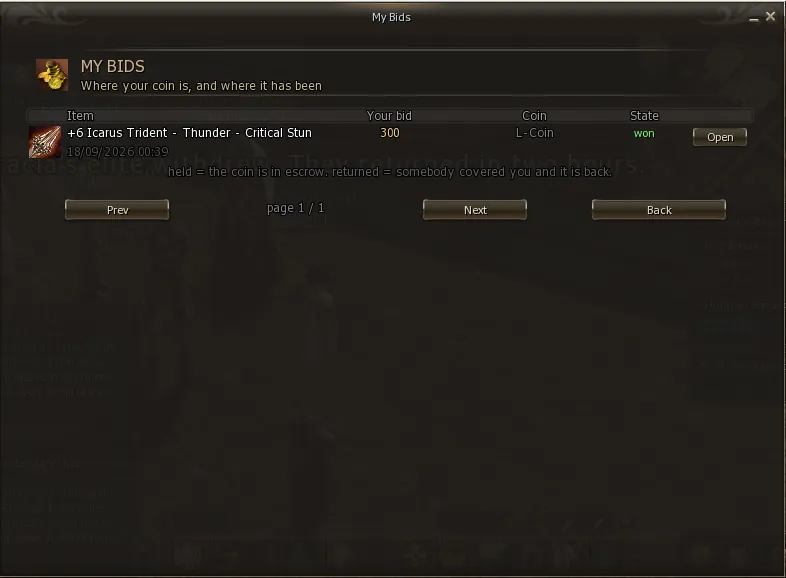
| State | Where your coin is |
|---|---|
| held | Held by the auction. You are currently winning that item |
| returned | Already back with you. Somebody covered your bid |
| won | Spent. You won the auction and the item is yours |
| voided | Bid voided at closing and repaid. See section 16 |
At the end of the duration the server closes the auction by itself. Nobody has to be online — not the seller, not the buyer.
In-game mail expires after 15 days. Once it does, the attachment goes with it. Won an item or sold something? Log in and collect it.
The auction's minimum level applies to bidding and listing. There is no level requirement to open the mail and take your prize.
Each delivery is logged with the item, the mail number and the date. If a prize is ever disputed, staff can look it up and see exactly where the item is — still in the mail or already collected, and by whom.
If an item does not show up under Sell an Item, it is because it falls under one of the rules on the right.
Even though the game will not let you trade an augmented item directly with another player, the auction accepts it. It moves the real item and the augment arrives intact for the buyer.
The classic auction scam is the seller bidding on their own item with another character, to push the real buyer higher. The Exodus auction has three layers against it.
| Rule | What happens |
|---|---|
| Same account | The bid is refused. Two characters on one account are the same person, with no room for doubt |
| Same IP | The bid is accepted and flagged. An IP can be legitimate — two brothers in one house, an internet café — so it does not block, but it is recorded |
| Character age | A character under 7 days old cannot bid. That is what catches the mule made on the spot |
A flagged bid cannot win. If it is the highest at closing it is voided, the coin goes back to whoever placed it, and the auction ends with no sale — the item returns to the seller, who gains nothing from the manoeuvre.
Every bid stores the identity of whoever placed it, at the moment it was placed. Staff can audit any auction after the fact, even with everyone involved offline.
No. The auction closes by itself and you receive the payment even offline.
No. It comes back the instant the other bid is accepted. Check My Bids — it will show as returned.
The item is still inside the 5 minute window after being listed. Wait and the bid box appears.
My Auctions → Open → Cancel listing. It only works with zero bids and after the 10 minute lock.
Not possible in game. After the first bid the auction runs to the end — that guarantee is what makes anyone feel safe bidding at all. For a genuine mistake, open a ticket with staff.
Augment is accepted. Check whether the item is equipped — that is the most common cause.
It is in your in-game mail. Open the inbox and take the attachment. Remember the 15 day limit.
Yes. As soon as you take it out of the mail it is yours and can go back on auction.
That is the normal case. On the form, the Amount field decides how many go on auction — the rest stays with you. You can even open several auctions from the same stack.
Cancel it while there are no bids and after the 10 minute lock has passed. The whole amount goes back to your bag.
The starting price was below 1,000,000, which is that house's floor. Raise the amount or use the L-Coin house.
5 per character and 10 per account.
back to contents ↑| Term | What it is |
|---|---|
| Auction house | One auction per currency. Exodus has two: Adena and L-Coin. |
| Starting price | The opening price. The first bid has to reach it. |
| Buy now | Instant buy. Pay and take it, closing the auction at once. |
| Minimum next bid | The smallest bid accepted right now: current bid + 5%. |
| Escrow | Coin held by the auction while a bid is winning. |
| held | Your coin is held — you are winning. |
| returned | Your coin is already back: somebody covered your bid. |
| won | You won and the coin was spent on the item. |
| voided | Bid voided at closing and repaid. |
| Anti-snipe | A bid in the last 5 minutes extends the auction by 5 minutes. |
| Bidding window | The 5 minutes after listing during which nobody can bid. |
| Cancel lock | The 10 minutes during which the seller cannot cancel. |
| Auctioneer | The auction NPC, in Giran. The only way in. |